

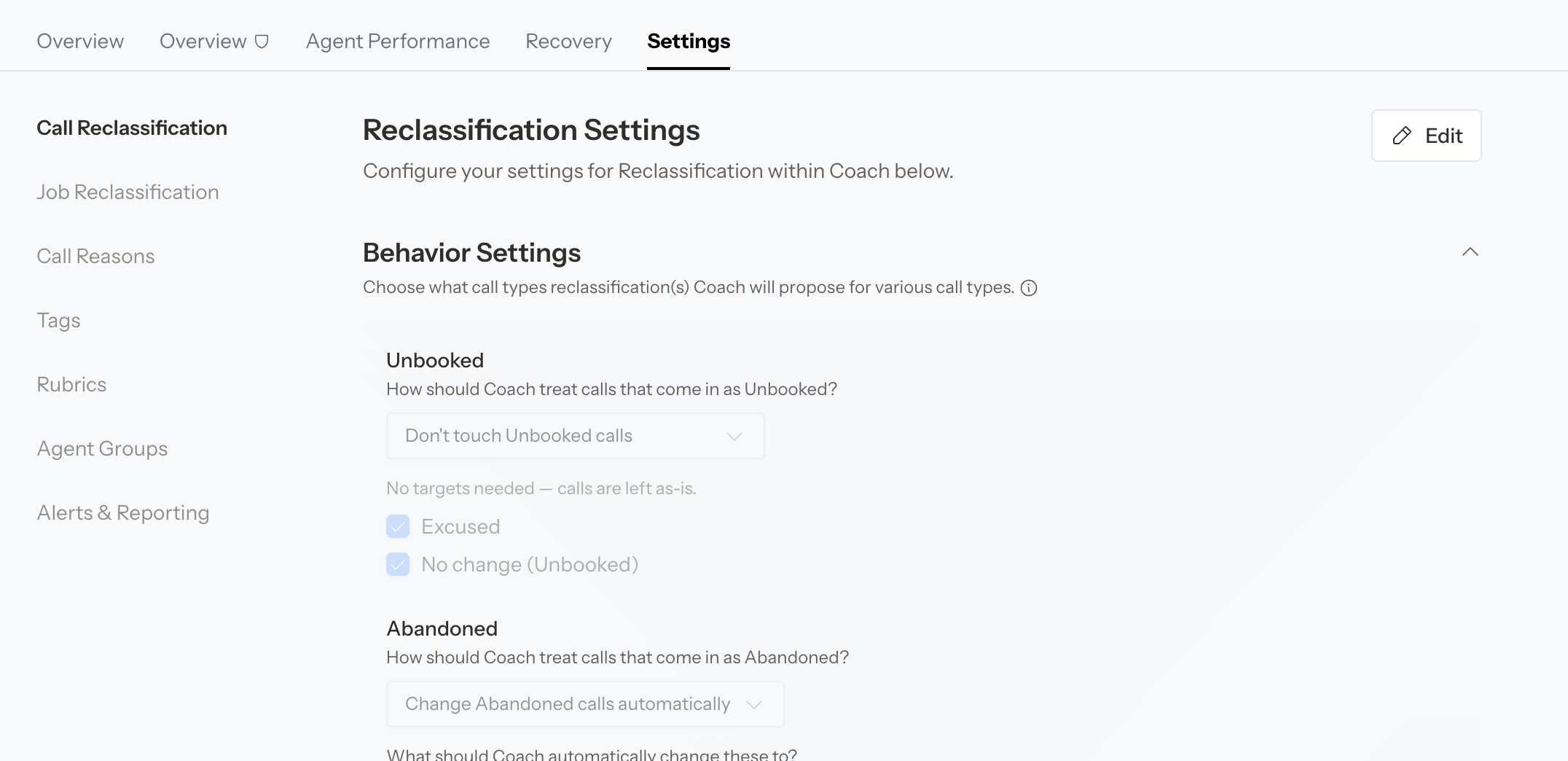
Coach Settings brings reclassification, call reasons, tags, rubrics, groups, reporting, and display controls into one area.
The Settings tab and individual editing controls depend on your permissions, integrations, and enabled Coach features. A page can be visible but read-only for your role.
Before you change a setting
- Identify the problem using a specific call or a filtered report.
- Decide whether the issue is call classification, call reason, tag logic, rubric grading, agent organization, notification delivery, or display.
- Make the smallest configuration change that addresses the cause.
- Save the page and test with representative calls.
- Review new results with the same filters.
Call Reclassification
Use Call Reclassification to define how Coach decides whether a call was a lead, whether it booked, and what to do when Coach disagrees with the current call type. See Review and automate call reclassification for the recommended validation and rollout workflow.Behavior Settings
Configure each source call type independently:- Unbooked
- Abandoned
- Excused
- Not a Lead
- Don’t touch: leave the source classification unchanged
- Suggest changes: place the supported alternative in the review workflow
- Change automatically: apply a supported alternative without waiting for review
Bookable criteria
Define what makes a call a genuine booking opportunity separately for:- Inbound calls
- Outbound calls
Booked criteria
Define the evidence Coach should treat as a confirmed booking separately for inbound and outbound calls. Be explicit about what counts as confirmation. A customer expressing interest is not necessarily a booked job.Automatic CSR correction
When available, choose how Coach handles the CSR it identifies from the transcript:- Off: show the inferred CSR as a suggestion
- Fill in missing CSRs: assign the inferred CSR only when no real CSR is present
- Always correct CSRs: also replace an existing CSR when the transcript clearly identifies a different person
Fallback CSR
ServiceTitan teams can select a fallback CSR for calls where no speaker can be detected, such as abandoned calls, auto-attendant interactions, or voicemail. A fallback is a placeholder for attribution. It should not be interpreted as proof that the selected person handled the call.ServiceTitan Memo Sync
When enabled, Coach writes an AI-generated, technician-facing memo into the ServiceTitan call’s ExcuseMemo after each processed call. Choose how Coach handles an existing memo:- Add to it, keeping what’s there: preserves CSR-written text and updates the Avoca-tagged block.
- Replace it with Avoca’s memo: writes only the generated Avoca memo. This can overwrite text entered by a CSR. Avoca retains a recovery copy of displaced text for 30 days.
- The separator and field order
- Whether each value comes from ServiceTitan data, the job type, or the transcript
- Allowed values, or a free-form text, ZIP code, or date format
- The value used when a field does not apply or cannot be determined
- Optional conditions or branches based on an earlier field
Understand the opportunity outcome memo field
The built-in Booked + opportunity outcome signal combines the confirmed booking result with Coach’s transcript-based opportunity decision. It can produce values such asBOOKED_OPPORTUNITY, UNBOOKED_OPPORTUNITY, BOOKED_NON_OPPORTUNITY, or UNBOOKED_NON_OPPORTUNITY.
Coach treats the call as an opportunity only when it represents net-new revenue, including when the caller:
- Books a new demand, inspection, or sales job
- Asks for a new job but cannot get a suitable slot
Call Reasons
Call reasons explain why a call occurred. They are separate from call type, lead status, and booking status.Create or sync reasons
You can:- Create a custom reason in Avoca
- Pull the latest reasons from ServiceTitan
- Search the configured list
- Activate or deactivate a reason
- Edit its description and bookability
- Delete or hide a reason when it is no longer used
- Name
- Description
- Bookable state
- Active state
Configure reason behavior
- Auto-reclassify by reason: automatically updates the ServiceTitan call reason when Coach’s confidence is at least 98%. Lower-confidence differences remain suggestions.
- Always require a call reason: assigns the best available reason even below the normal confidence threshold.
Tags
Coach tags classify signals such as objection type, call quality, customer intent, or another business-specific condition.Create a tag group
A tag group defines the context and selection behavior for its tags:- Name
- Description
- Call type condition
- Call direction: inbound, outbound, or both
- Selection rule: how many tags in the group Coach can or must apply
- Enabled state
Create a tag
Each tag can include:- A ServiceTitan tag mapping
- A display label
- A required classification description
- Customer type: new, existing, or both
- An optional agent restriction
- An enabled state
Import and sync tags
ServiceTitan teams can import available tags, then add the descriptions Coach needs. Enable Auto-reclassify by tag to push mapped, enabled tags from enabled groups onto matching ServiceTitan calls. Unmapped tags remain Avoca-only even when automatic tag sync is on.Rubrics
Rubrics define the expected agent behavior and scoring model. Use this page to:- Create inbound and outbound rubrics
- Start from a default template
- Set title, direction, active state, and selection criteria
- Add sections and criteria
- Assign criterion points
- Test active rubrics with the Rubric Playground
- Maintain the objection-handling playbook
Agent Groups
Agent groups organize agents for Coach filters, dashboards, comparisons, rubrics, alerts, and the daily report. To create a group:- Select Edit.
- Select New group.
- Name the group.
- Add members.
- Include unassigned calls if they should belong in the group.
- Optionally mark it as the default group.
- Save the group, then select Done.
Alerts & Reporting
This page has separate Alerts and Daily Coach Report sections.Alerts
Enable real-time alerts, then configure supported channels:- Email: a fixed recipient list
- Slack: a channel in the team’s connected workspace
- Microsoft Teams: an incoming webhook URL
- Unbooked calls: bookable inbound ServiceTitan calls that did not book, excluding Avoca AI agent calls
- Misclassified calls: calls where Coach’s call type or reason disagrees with ServiceTitan and the call has not been reclassified
Daily Coach Report
Choose one delivery mode:- Standard: automatically sent to the team’s admins and agents
- Custom: choose recipients, timing, directions, and report sections
- Off: do not send a daily report
- To and optional Cc recipients
- Send time in the team’s local timezone
- Inbound and outbound call inclusion
- Summary fields: calls, leads, booked calls, average score, and AI changes
- Deep dives: top unbooked reasons and top failed rubric items
Display
Display settings control the colors used for:- Coaching Score on call and agent tables
- Booking Rate on team and agent performance
- Coaching Score: green at 80, yellow at 60, red at 0
- Booking Rate: green at 70, yellow at 50, red at 0
Validate a configuration change
After saving:- Open a recent call that should match the new behavior.
- Confirm the selected call type, reason, tags, and rubric.
- Review the Activity tab for the initial and updated values.
- If ServiceTitan sync is expected, open the ServiceTitan record.
- Monitor new calls rather than assuming historical records will be recomputed.
- Compare the same filtered population before and after the change.