Choose the number Avoca dials during system maintenance or outages.
Break Glass is a safety switch. If something ever prevents your Avoca assistant from answering normally, Avoca sends your incoming calls to a number you choose — your call center, your office line, whichever transfer destination you nominate — instead of letting the assistant handle them.Break Glass chooses a destination for each call. If Avoca cannot work out where to send a call, it does not divert it: the call stays with your assistant and is answered as usual.
Set this up now, before it’s needed. It’s easiest for Break Glass to help when a number has already been chosen.
Open Responder → Transfer Destinations and edit the destination you want Avoca to dial.
1
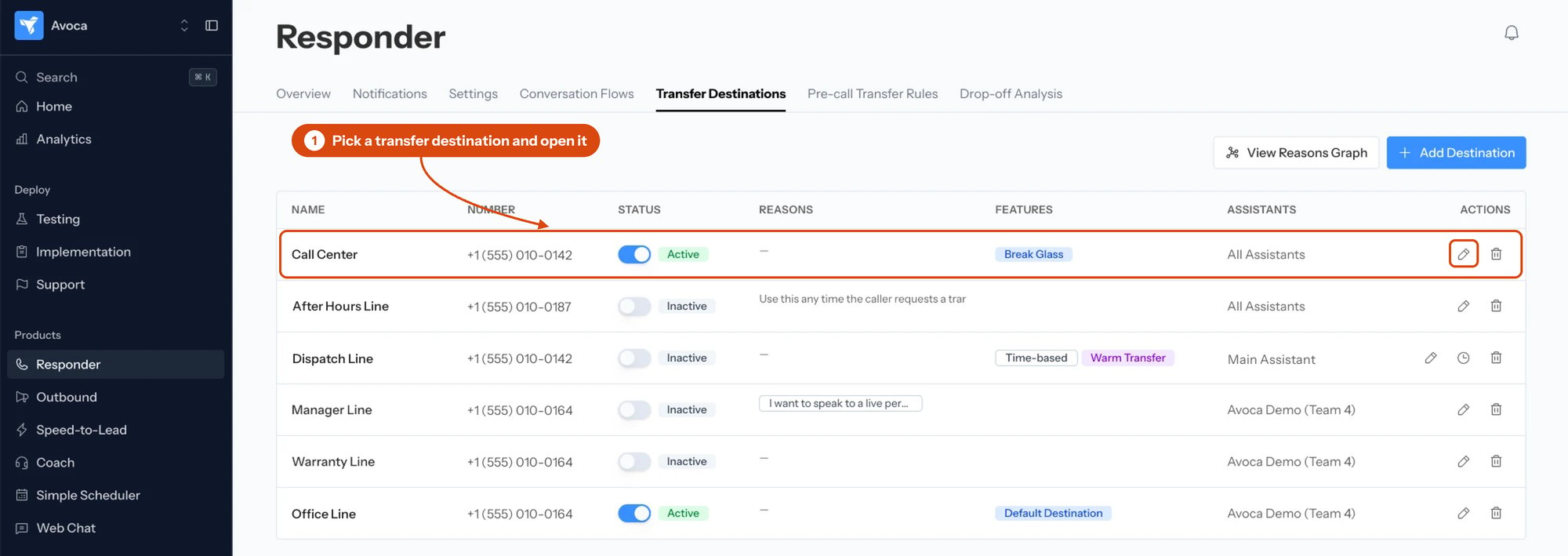
Pick a transfer destination
Open the destination you want Avoca to dial with the pencil in its Actions column.
2
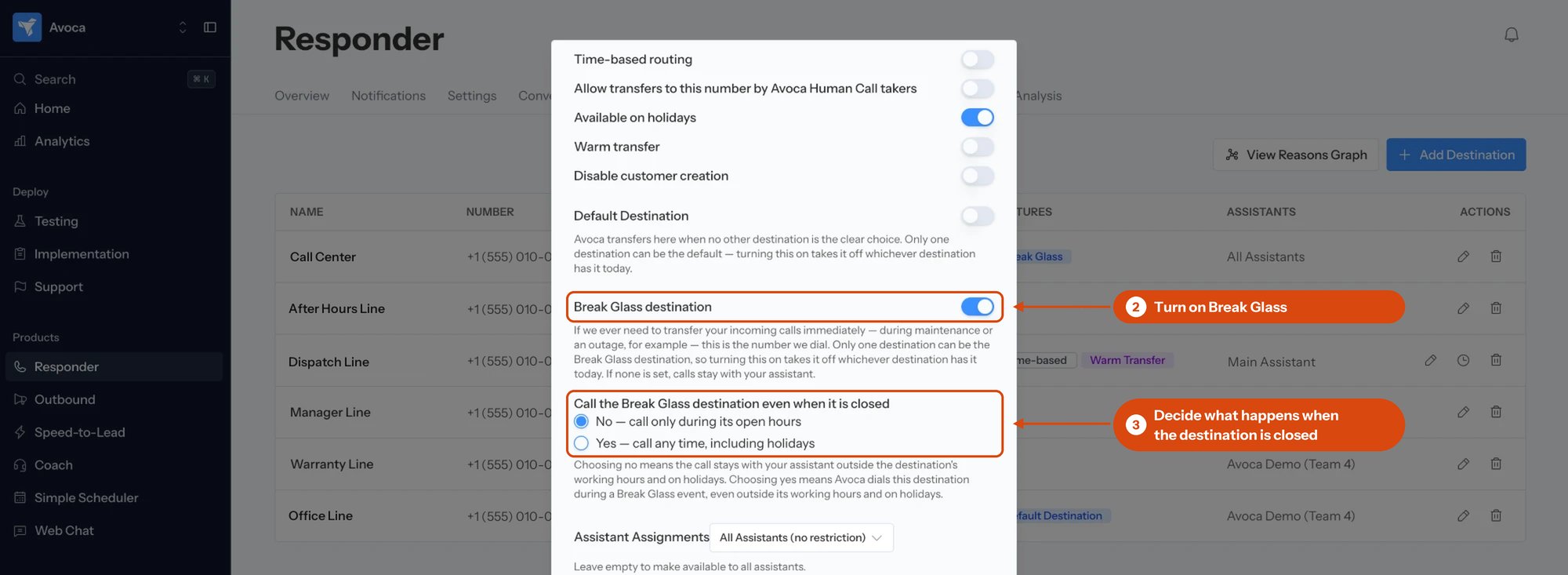
Turn on Break Glass destination
In the destination dialog, below Default Destination, switch on Break Glass destination. Only one destination can hold it, so turning it on here takes it off whichever destination has it today.
Both Break Glass settings sit together in the destination dialog: the switch, and the closed-hours choice below it.
3
Decide what happens when that number is closed
Choose No — call only during its open hours (the default) or Yes — call any time, including holidays. See When the destination is closed below.
4
Save
You’re all set!
Back on the Transfer Destinations list, the destination you chose carries a Break Glass badge. A destination can hold both Break Glass and Default Destination, either, or neither — they are separate settings that do different jobs. Default Destination is where your assistant transfers a caller mid-call when no other destination is the clear choice. Break Glass is where calls go when the assistant is not available due to maintenance or an outage.If no destination is set as your Break Glass destination, nothing breaks. Your calls simply stay with your assistant during an incident, which is safe but means Break Glass does nothing for you.
If the message reads “We couldn’t load your Break Glass setting just now,” the Break Glass switch is temporarily unavailable and cannot be changed. Choose Try again. Every other field on the form still saves normally.
By default, Avoca only dials your Break Glass destination while that destination is open. “Open” means:
Inside the open-hours windows configured on that destination, read in your account’s timezone.
On a day marked on your holiday calendar, only if that holiday allows transfers and the destination is not marked as unavailable on holidays. An ordinary holiday on its own leaves the number available.
Choose Yes — call any time, including holidays to set both of those aside. The number is then dialed whatever the clock and the calendar say.With No selected, a call arriving outside those hours is not diverted — it stays with your assistant and is answered as usual.
The call is forwarded silently. Your caller hears the line ring through to the chosen number; there is no announcement and no extra step for them.Whoever answers sees the caller’s own number, not an Avoca number. Existing screen pops, caller lookups, and callbacks keep working.Calls handled this way are not answered, summarized, or booked by your assistant.Once a call has been sent to your chosen number, it rings there. If it is busy or nobody picks up, the call ends the way any call to that number would — your assistant does not take it back. Choose a number that is reliably answered during the hours you allow it to be dialed.
To move Break Glass to a different number, open the new destination and turn on Break Glass destination. That takes it off the old one automatically.Avoca will not let you delete or deactivate the destination that currently holds Break Glass. Move Break Glass to another destination first, then delete or deactivate the old one. This is deliberate: it prevents an account from quietly losing its emergency number and only discovering it during an incident.Editing the destination in any other way — its name, number, hours, or holiday behavior — works normally while it holds Break Glass. Remember that changes to its hours and to your holiday calendar change when Break Glass can use it.
Yes — leave your Break Glass destination unset. With nothing chosen, your calls stay with your assistant during an incident. There is no separate opt-out.
Can I trigger Break Glass myself?
No. Starting and ending a diversion is an Avoca operational decision — see When Avoca uses Break Glass. Your setting only tells Avoca where to send your calls if that happens.
We were told there was an incident, but our number never rang.
The most common reasons are that no Break Glass destination was set, the chosen destination was inactive or had no number, or it was outside that destination’s open hours or closed for a holiday while No — call only during its open hours was selected. In each case the call stayed with your assistant.Break Glass also cannot help with an incident affecting telephony itself. It works by dialing a different number, so it depends on calls being able to reach that number in the first place.
Does Break Glass use the same list as my in-call transfers?
Yes. Break Glass picks from the transfer destinations you already have; see Configure call transfers. It is not the same as Default Destination, which is where your assistant transfers a caller during a live conversation.
How soon does a change take effect?
Saving applies immediately for most purposes, but part of the Break Glass system is deliberately held outside Avoca so it keeps working if Avoca cannot answer, and your setting is copied out to it. A change made moments before — or during — an incident may not have arrived there yet. Set your destination ahead of time rather than during an outage.
Was this page helpful?
Assistant
Responses are generated using AI and may contain mistakes.