> ## Documentation Index
> Fetch the complete documentation index at: https://help.avoca.ai/llms.txt
> Use this file to discover all available pages before exploring further.
# Understand unbooked Avoca call reasons
> Use the standard Avoca reason definitions to understand why qualified calls did not result in a booking.
Unbooked call reasons explain the specific outcome that prevented a qualified service opportunity from becoming an appointment.
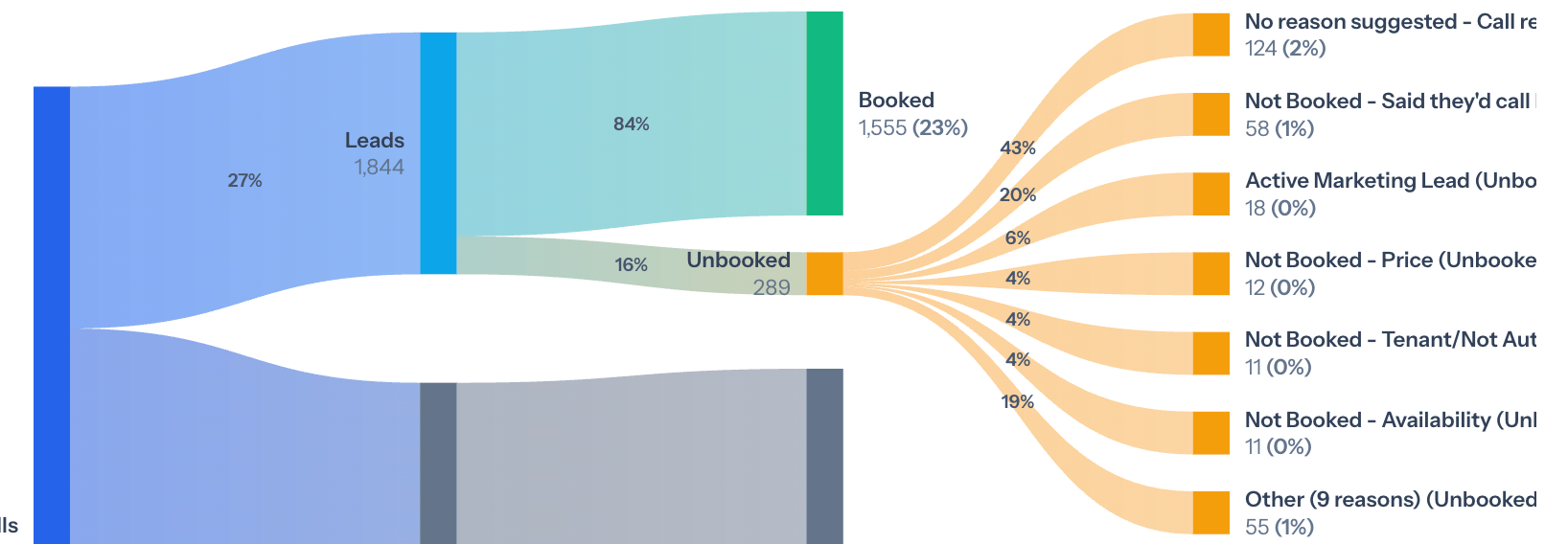
Use these definitions when reviewing **Top Unbooked Reasons**, validating a suggested reason, or writing descriptions for a team's active reason list.
The active list can differ by team. ServiceTitan teams can sync their own reasons, and administrators can create custom Avoca reasons. Use the names and descriptions shown in your team's **Coach → Settings → Call Reasons** page when they differ from this reference.
## Review unbooked reasons in Coach
1. Open **Coach → Overview**.
2. Set the date range and relevant agent, group, direction, or campaign filters.
3. Find **Top Unbooked Reasons**.
4. Select a prominent reason to inspect the underlying calls.
5. Compare the current and suggested reason with the recording and transcript.
6. Decide whether the pattern is caused by agent behavior, availability, policy, pricing, service area, or classification.
A reason describes *why* the lead did not book. It is separate from the call type, lead status, booking status, and any tags.
 ## Standard unbooked reason definitions
| Reason | Use when… |
| -------------------------------------------------------------------------- | ------------------------------------------------------------------------------------------------------------------------------------ |
| **Quote or Estimate Visit Scheduled, No Service Appointment Booked** | The customer agreed to a quote or estimate visit but did not commit to the actual service. |
| **Membership Renewal Declined, No Service Requested** | The customer declined a membership or service-plan renewal and did not request service, cancellation, or an appointment. |
| **Placed in Callback Queue, No Agreement to Schedule or Callback** | The customer entered a callback queue without explicitly agreeing to a callback or another next step. |
| **Prioritization or Escalation Request for Existing Appointment** | The caller asked to prioritize or escalate an existing appointment without booking, rescheduling, or confirming a new appointment. |
| **Customer Unavailable, No Agreement to Schedule or Callback** | The customer could not proceed and did not agree to a callback or another next step. |
| **Outbound Informational or Promotional Message, No Customer Interaction** | An outbound informational or promotional message produced no customer interaction or booking attempt. |
| **Company Document Request Only, No Service Scheduled** | The caller requested company documentation, such as a certificate of insurance or license, without discussing or scheduling service. |
| **Pending Paperwork Completion Before Booking** | Required paperwork must be completed and returned before a membership or service appointment can be finalized. |
| **Opted to Resolve Issue Independently** | The customer chose to handle the issue without scheduling service. |
| **Customer Opted to Contact Internal Company Representative** | The customer declined scheduling and chose to contact another internal representative or manager. |
| **Caller No Longer Associated with Property** | The caller is no longer responsible for the property and asked to be removed from contacts or notifications. |
| **Multiple Estimates Required by Policy** | The customer or organization must collect multiple estimates before approving service. |
| **Customer Declined Due to Required Credential or Certification** | The customer required a credential or certification the company does not have and declined to proceed. |
| **Credit or Refund Opted Instead of Booking** | The customer chose a credit, refund, or account adjustment instead of scheduling service. |
| **Advised to Use Online Form to Schedule** | The caller was directed to submit the request or schedule through an online form or portal. |
| **Awaiting Contract Review Before Booking** | A contract must be reviewed or approved before scheduling can proceed. |
| **Work Request Only, No Appointment Scheduled** | The call created or discussed a work request without setting an appointment. |
| **Awaiting Down Payment Before Booking** | An invoice or required down payment must be received before an appointment can be scheduled. |
| **Awaiting Company Follow-Up to Schedule Appointment** | The company must confirm details in a later follow-up and no appointment date or time was set. |
| **Cancellation with Intent to Reschedule, No New Date Set** | An existing appointment was canceled and the customer intended to reschedule later without selecting a new date. |
| **Awaiting Company-Generated Quote or Task Before Booking** | The company must create a quote, task, or invoice before scheduling can proceed. |
| **Booking Prevented Due to Existing Open Ticket** | An open ticket or appointment prevented a duplicate or overlapping booking. |
| **Estimate Accepted, No Appointment Scheduled** | The customer accepted an estimate but did not set an appointment date or time. |
| **Cancellation Request Only, No New Booking** | The caller canceled an appointment without requesting rescheduling or new service. |
| **Required Communication Channel Not Provided** | A required communication method, such as email or a portal, was unavailable. |
| **Required Company Document Not Provided** | The company had not provided documentation the customer required before proceeding. |
| **Opted to Schedule In-Person with Technician** | The customer declined to schedule on the call and planned to arrange service directly with a technician. |
| **Customer Declined Callback, No Appointment Scheduled** | The customer declined a callback and no appointment was booked. |
| **Account Hold or Restriction Prevented Booking** | An account hold or internal restriction prevented scheduling. |
| **Company Refused Service Request** | The company declined the service request for an internal or unspecified reason. |
| **Service Refused Due to Adversarial Behavior** | The company declined service because of adversarial, contentious, or disrespectful customer behavior. |
| **Pending Financing Application Before Booking** | Financing approval is required before the appointment can be scheduled. |
| **Agent Unable to Finalize Booking** | The agent could not complete the booking for an unspecified reason and did not arrange a callback or appointment. |
| **Company Policy Restriction on Service Eligibility** | Company policy made the customer or equipment ineligible for service, such as an equipment-age or installation-origin restriction. |
## Maintain useful reason descriptions
Good descriptions:
* Separate easily confused outcomes
* State the event that prevented booking
* Avoid duplicating another active reason
* Explain whether the reason represents a lead
* Use a catch-all only when no specific reason is reliable
If the wrong reason is selected repeatedly, improve the descriptions that distinguish the two reasons before adding another near-duplicate.
## Configure reason behavior
Under **Coach → Settings → Call Reasons**, an authorized user can:
* Sync reasons from ServiceTitan
* Create Avoca-only reasons
* Edit descriptions and bookability
* Activate or deactivate reasons
* Enable automatic reason reclassification
* Require a reason on every supported call
Automatic ServiceTitan reason updates require at least **98% confidence**. Lower-confidence differences remain suggestions unless the team requires a reason.
See [Review and automate call reclassification](/coach/reclassification) for a safe rollout.
## Standard unbooked reason definitions
| Reason | Use when… |
| -------------------------------------------------------------------------- | ------------------------------------------------------------------------------------------------------------------------------------ |
| **Quote or Estimate Visit Scheduled, No Service Appointment Booked** | The customer agreed to a quote or estimate visit but did not commit to the actual service. |
| **Membership Renewal Declined, No Service Requested** | The customer declined a membership or service-plan renewal and did not request service, cancellation, or an appointment. |
| **Placed in Callback Queue, No Agreement to Schedule or Callback** | The customer entered a callback queue without explicitly agreeing to a callback or another next step. |
| **Prioritization or Escalation Request for Existing Appointment** | The caller asked to prioritize or escalate an existing appointment without booking, rescheduling, or confirming a new appointment. |
| **Customer Unavailable, No Agreement to Schedule or Callback** | The customer could not proceed and did not agree to a callback or another next step. |
| **Outbound Informational or Promotional Message, No Customer Interaction** | An outbound informational or promotional message produced no customer interaction or booking attempt. |
| **Company Document Request Only, No Service Scheduled** | The caller requested company documentation, such as a certificate of insurance or license, without discussing or scheduling service. |
| **Pending Paperwork Completion Before Booking** | Required paperwork must be completed and returned before a membership or service appointment can be finalized. |
| **Opted to Resolve Issue Independently** | The customer chose to handle the issue without scheduling service. |
| **Customer Opted to Contact Internal Company Representative** | The customer declined scheduling and chose to contact another internal representative or manager. |
| **Caller No Longer Associated with Property** | The caller is no longer responsible for the property and asked to be removed from contacts or notifications. |
| **Multiple Estimates Required by Policy** | The customer or organization must collect multiple estimates before approving service. |
| **Customer Declined Due to Required Credential or Certification** | The customer required a credential or certification the company does not have and declined to proceed. |
| **Credit or Refund Opted Instead of Booking** | The customer chose a credit, refund, or account adjustment instead of scheduling service. |
| **Advised to Use Online Form to Schedule** | The caller was directed to submit the request or schedule through an online form or portal. |
| **Awaiting Contract Review Before Booking** | A contract must be reviewed or approved before scheduling can proceed. |
| **Work Request Only, No Appointment Scheduled** | The call created or discussed a work request without setting an appointment. |
| **Awaiting Down Payment Before Booking** | An invoice or required down payment must be received before an appointment can be scheduled. |
| **Awaiting Company Follow-Up to Schedule Appointment** | The company must confirm details in a later follow-up and no appointment date or time was set. |
| **Cancellation with Intent to Reschedule, No New Date Set** | An existing appointment was canceled and the customer intended to reschedule later without selecting a new date. |
| **Awaiting Company-Generated Quote or Task Before Booking** | The company must create a quote, task, or invoice before scheduling can proceed. |
| **Booking Prevented Due to Existing Open Ticket** | An open ticket or appointment prevented a duplicate or overlapping booking. |
| **Estimate Accepted, No Appointment Scheduled** | The customer accepted an estimate but did not set an appointment date or time. |
| **Cancellation Request Only, No New Booking** | The caller canceled an appointment without requesting rescheduling or new service. |
| **Required Communication Channel Not Provided** | A required communication method, such as email or a portal, was unavailable. |
| **Required Company Document Not Provided** | The company had not provided documentation the customer required before proceeding. |
| **Opted to Schedule In-Person with Technician** | The customer declined to schedule on the call and planned to arrange service directly with a technician. |
| **Customer Declined Callback, No Appointment Scheduled** | The customer declined a callback and no appointment was booked. |
| **Account Hold or Restriction Prevented Booking** | An account hold or internal restriction prevented scheduling. |
| **Company Refused Service Request** | The company declined the service request for an internal or unspecified reason. |
| **Service Refused Due to Adversarial Behavior** | The company declined service because of adversarial, contentious, or disrespectful customer behavior. |
| **Pending Financing Application Before Booking** | Financing approval is required before the appointment can be scheduled. |
| **Agent Unable to Finalize Booking** | The agent could not complete the booking for an unspecified reason and did not arrange a callback or appointment. |
| **Company Policy Restriction on Service Eligibility** | Company policy made the customer or equipment ineligible for service, such as an equipment-age or installation-origin restriction. |
## Maintain useful reason descriptions
Good descriptions:
* Separate easily confused outcomes
* State the event that prevented booking
* Avoid duplicating another active reason
* Explain whether the reason represents a lead
* Use a catch-all only when no specific reason is reliable
If the wrong reason is selected repeatedly, improve the descriptions that distinguish the two reasons before adding another near-duplicate.
## Configure reason behavior
Under **Coach → Settings → Call Reasons**, an authorized user can:
* Sync reasons from ServiceTitan
* Create Avoca-only reasons
* Edit descriptions and bookability
* Activate or deactivate reasons
* Enable automatic reason reclassification
* Require a reason on every supported call
Automatic ServiceTitan reason updates require at least **98% confidence**. Lower-confidence differences remain suggestions unless the team requires a reason.
See [Review and automate call reclassification](/coach/reclassification) for a safe rollout.