> ## Documentation Index
> Fetch the complete documentation index at: https://help.avoca.ai/llms.txt
> Use this file to discover all available pages before exploring further.
# Review and automate call reclassification
> Validate Coach suggestions, configure automatic reclassification, correct calls manually, and protect ServiceTitan reporting.
Coach reclassification compares the disposition on an ingested call with what happened in the transcript. It can suggest or apply corrections to the call type and, when configured, the call reason, tags, and CSR attribution.
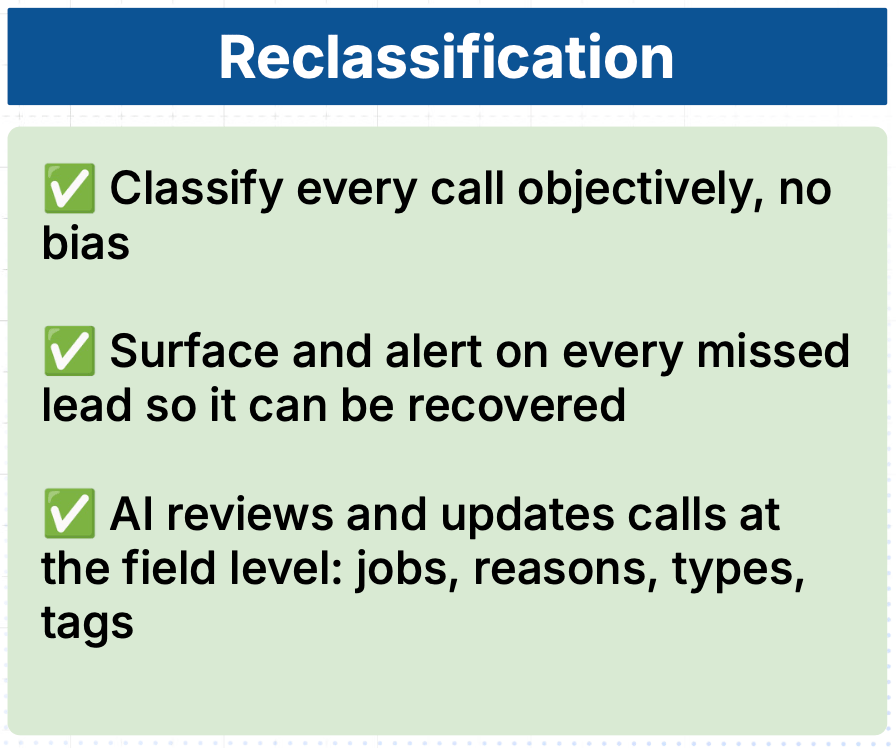
Use reclassification to make booking-rate reporting more accurate and surface qualified unbooked calls that may be recoverable.
Reclassification runs after a call ends. New results usually appear after the call has been ingested, transcribed, and evaluated; automatic ServiceTitan updates can take additional time.
## Why reclassification matters
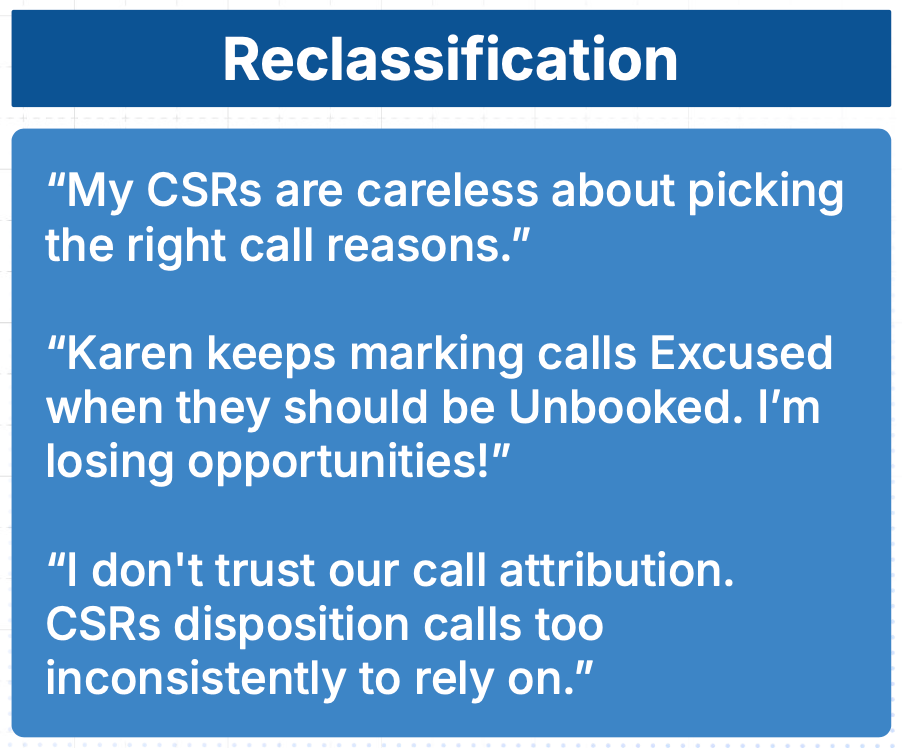
Manual disposition is inconsistent at scale. A genuine lead can be marked excused, similar conversations can receive different reasons, and a recoverable opportunity can disappear from the team's workflow.
Coach evaluates the transcript with one set of criteria, making the disagreement visible before the team decides whether to correct it automatically.
 ## Understand the classifications
| Call type | Meaning |
| -------------- | ----------------------------------------------------------------------------------------------------- |
| **Booked** | A job or appointment was booked |
| **Unbooked** | A genuine service opportunity did not result in a booking |
| **Excused** | The conversation was not a service request |
| **Not a Lead** | The conversation did not represent a new booking opportunity, such as work related to an existing job |
| **Abandoned** | No meaningful agent-customer conversation occurred, such as no answer or voicemail |
Calls already classified as **Booked** are not call-type-reclassified by the standard policy. Supported call-reason, tag, CSR, or linked-job corrections can still be available.
## Choose how Coach handles each source type
Open **Coach → Settings → Call Reclassification**.
For each supported original disposition, choose:
| Mode | Result |
| ------------------------ | ---------------------------------------------------------------- |
| **Don't touch** | Coach leaves the source classification unchanged |
| **Suggest changes** | Coach places a supported alternative in the review workflow |
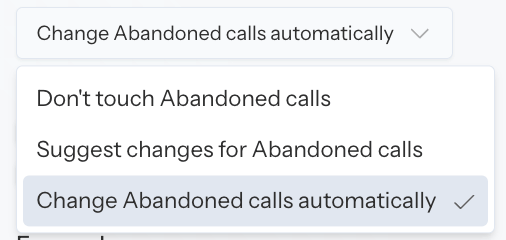
| **Change automatically** | Coach applies a supported alternative without waiting for review |
When suggestions or automatic changes are enabled, select the target types Coach is allowed to use.
Automatic reclassification can update production ServiceTitan data and changes the population behind Coach reporting. Validate the behavior in suggestion mode before enabling automatic changes.
## Roll out reclassification safely
### 1. Review suggestions
1. Open **Coach → Overview**.
2. Set a representative date range.
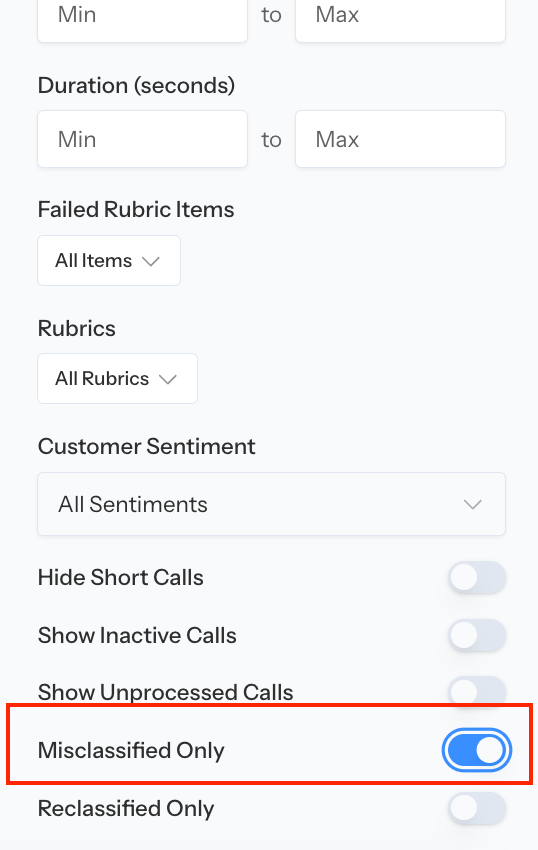
3. Filter for misclassified, unreviewed, qualified-unbooked, or empty-reason calls when those filters are available.
4. Open calls from different agents, directions, and source dispositions.
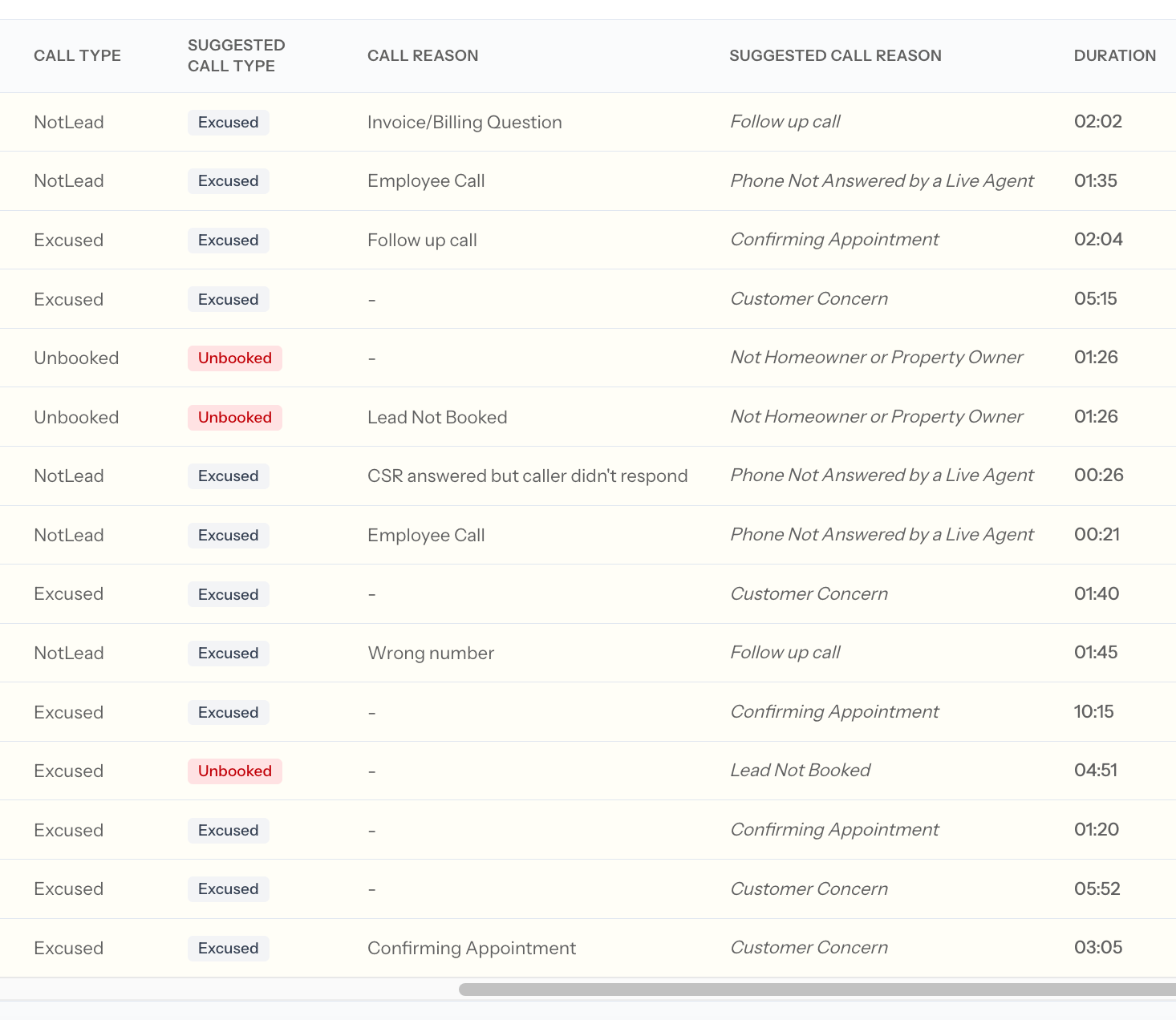
5. Compare the recording and transcript with the current and suggested call type, reason, tags, and CSR.
6. Apply accurate suggestions manually.
## Understand the classifications
| Call type | Meaning |
| -------------- | ----------------------------------------------------------------------------------------------------- |
| **Booked** | A job or appointment was booked |
| **Unbooked** | A genuine service opportunity did not result in a booking |
| **Excused** | The conversation was not a service request |
| **Not a Lead** | The conversation did not represent a new booking opportunity, such as work related to an existing job |
| **Abandoned** | No meaningful agent-customer conversation occurred, such as no answer or voicemail |
Calls already classified as **Booked** are not call-type-reclassified by the standard policy. Supported call-reason, tag, CSR, or linked-job corrections can still be available.
## Choose how Coach handles each source type
Open **Coach → Settings → Call Reclassification**.
For each supported original disposition, choose:
| Mode | Result |
| ------------------------ | ---------------------------------------------------------------- |
| **Don't touch** | Coach leaves the source classification unchanged |
| **Suggest changes** | Coach places a supported alternative in the review workflow |
| **Change automatically** | Coach applies a supported alternative without waiting for review |
When suggestions or automatic changes are enabled, select the target types Coach is allowed to use.
Automatic reclassification can update production ServiceTitan data and changes the population behind Coach reporting. Validate the behavior in suggestion mode before enabling automatic changes.
## Roll out reclassification safely
### 1. Review suggestions
1. Open **Coach → Overview**.
2. Set a representative date range.
3. Filter for misclassified, unreviewed, qualified-unbooked, or empty-reason calls when those filters are available.
4. Open calls from different agents, directions, and source dispositions.
5. Compare the recording and transcript with the current and suggested call type, reason, tags, and CSR.
6. Apply accurate suggestions manually.
 Do not judge the configuration from one unusual call. Review a representative sample and look for a repeatable error pattern.
### 2. Correct the underlying guidance
If suggestions repeatedly miss:
* Refine inbound and outbound **Bookable criteria**
* Refine inbound and outbound **Booked criteria**
* Add clear, distinct **Call Reason** descriptions
* Clarify tag-group conditions and tag descriptions
* Configure a fallback CSR for voicemail and no-speaker calls
Change the smallest rule that explains the repeated error, then review a fresh sample.
### 3. Prepare call reasons
Open **Coach → Settings → Call Reasons**.
1. Pull unsynced reasons from ServiceTitan when applicable.
2. Add a precise description to every active reason.
3. Confirm whether each reason is bookable.
4. Deactivate obsolete or overlapping reasons.
5. Save the list.
See [Understand unbooked Avoca call reasons](/coach/unbooked-call-reasons) for the standard unbooked-reason definitions.
### 4. Enable automatic changes narrowly
Move one source disposition from **Suggest changes** to **Change automatically** only after its suggestions are consistently accurate.
Then:
1. Monitor new calls for that source.
2. Review misclassified and low-confidence cases.
3. Confirm supported updates in ServiceTitan.
4. Expand to another source only after the first one remains reliable.
Do not judge the configuration from one unusual call. Review a representative sample and look for a repeatable error pattern.
### 2. Correct the underlying guidance
If suggestions repeatedly miss:
* Refine inbound and outbound **Bookable criteria**
* Refine inbound and outbound **Booked criteria**
* Add clear, distinct **Call Reason** descriptions
* Clarify tag-group conditions and tag descriptions
* Configure a fallback CSR for voicemail and no-speaker calls
Change the smallest rule that explains the repeated error, then review a fresh sample.
### 3. Prepare call reasons
Open **Coach → Settings → Call Reasons**.
1. Pull unsynced reasons from ServiceTitan when applicable.
2. Add a precise description to every active reason.
3. Confirm whether each reason is bookable.
4. Deactivate obsolete or overlapping reasons.
5. Save the list.
See [Understand unbooked Avoca call reasons](/coach/unbooked-call-reasons) for the standard unbooked-reason definitions.
### 4. Enable automatic changes narrowly
Move one source disposition from **Suggest changes** to **Change automatically** only after its suggestions are consistently accurate.
Then:
1. Monitor new calls for that source.
2. Review misclassified and low-confidence cases.
3. Confirm supported updates in ServiceTitan.
4. Expand to another source only after the first one remains reliable.
 For automatic call-reason updates, Coach applies the reason only when confidence is at least **98%**. Lower-confidence disagreements remain suggestions unless **Always require a call reason** is enabled.
If **Always require a call reason** is on, maintain accurate catch-all options such as an "Other Lead" and "Other Non-Lead" reason. Otherwise an uncertain call can be forced into a misleadingly specific reason.
## Correct one call manually
Open a call from Overview, Agent Performance, Rubric Performance, or another Coach call list.
1. Review the recording, transcript, summary, current disposition, and Coach suggestions.
2. Select **Edit call details** when your permissions allow it.
3. Update only the fields supported for that call and source.
4. Save the smallest correction necessary.
5. Open **Activity** to confirm the initial and updated values.
6. If ServiceTitan sync is expected, verify the ServiceTitan record.
Supported controls can include call type, call reason, tags, CSR, notes, linked job, and selected job fields.
See [Review a Coach call](/coach/call-review#edit-call-details) for the complete call-review workflow.
## Manage CSR attribution
When enabled, Coach can infer the CSR from the transcript.
Choose whether Coach should:
* Show the inferred CSR as a suggestion
* Fill the CSR only when the call is unassigned
* Correct an existing CSR when Coach identifies a different speaker
For automatic call-reason updates, Coach applies the reason only when confidence is at least **98%**. Lower-confidence disagreements remain suggestions unless **Always require a call reason** is enabled.
If **Always require a call reason** is on, maintain accurate catch-all options such as an "Other Lead" and "Other Non-Lead" reason. Otherwise an uncertain call can be forced into a misleadingly specific reason.
## Correct one call manually
Open a call from Overview, Agent Performance, Rubric Performance, or another Coach call list.
1. Review the recording, transcript, summary, current disposition, and Coach suggestions.
2. Select **Edit call details** when your permissions allow it.
3. Update only the fields supported for that call and source.
4. Save the smallest correction necessary.
5. Open **Activity** to confirm the initial and updated values.
6. If ServiceTitan sync is expected, verify the ServiceTitan record.
Supported controls can include call type, call reason, tags, CSR, notes, linked job, and selected job fields.
See [Review a Coach call](/coach/call-review#edit-call-details) for the complete call-review workflow.
## Manage CSR attribution
When enabled, Coach can infer the CSR from the transcript.
Choose whether Coach should:
* Show the inferred CSR as a suggestion
* Fill the CSR only when the call is unassigned
* Correct an existing CSR when Coach identifies a different speaker
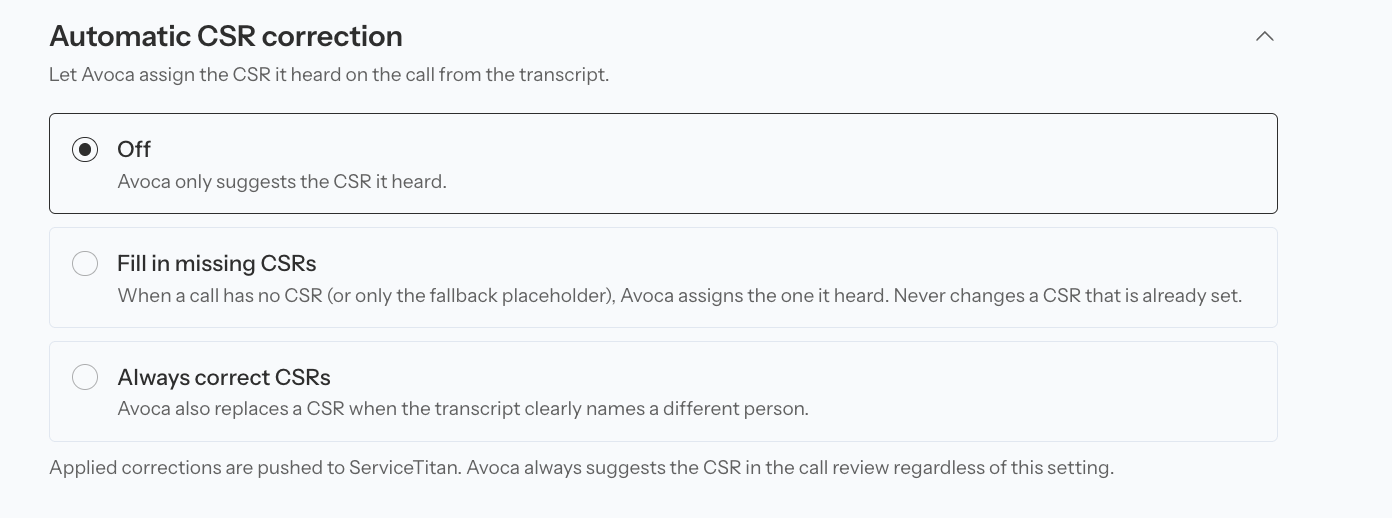 For no-speaker calls, configure a dedicated fallback CSR rather than attributing voicemail or abandoned calls to a real agent.
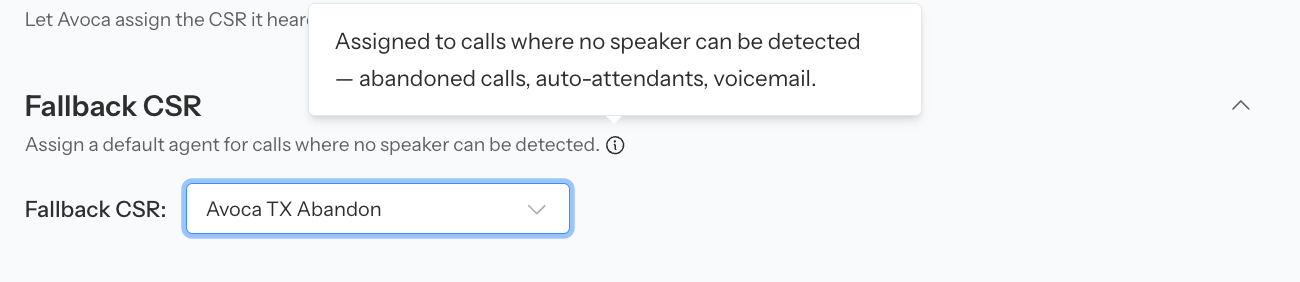 Validate CSR correction carefully because attribution affects individual performance reporting and can update ServiceTitan.
## Apply tags safely
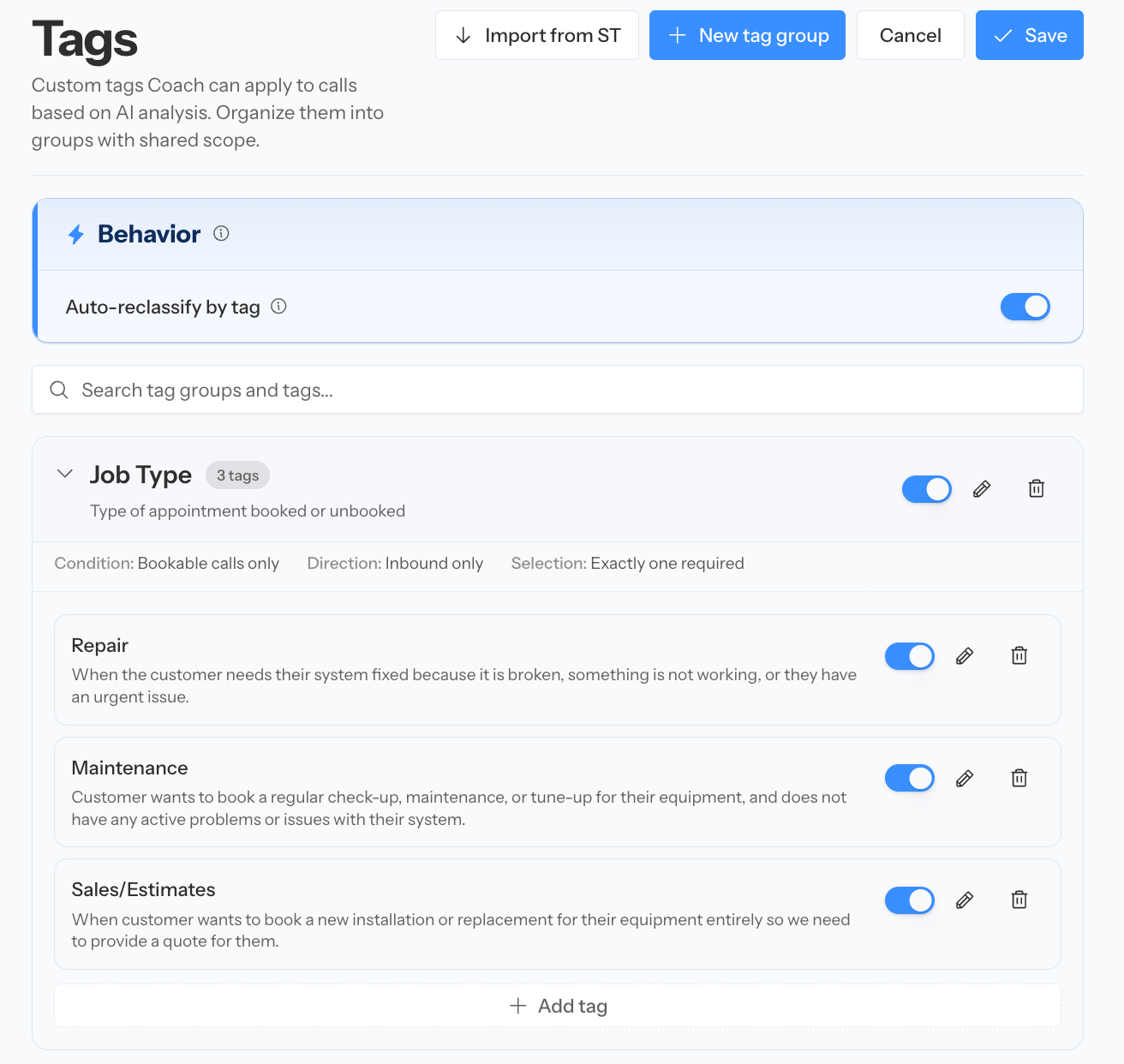
Under **Coach → Settings → Tags**, define:
* When the group applies
* Inbound, outbound, or both
* How many tags Coach can or must select
* A distinct description for every tag
* The ServiceTitan tag mapping, when applicable
Test tag descriptions against real calls before enabling automatic tag reclassification.
Validate CSR correction carefully because attribution affects individual performance reporting and can update ServiceTitan.
## Apply tags safely
Under **Coach → Settings → Tags**, define:
* When the group applies
* Inbound, outbound, or both
* How many tags Coach can or must select
* A distinct description for every tag
* The ServiceTitan tag mapping, when applicable
Test tag descriptions against real calls before enabling automatic tag reclassification.
 ## Connect reclassification to Recovery
When Recovery is enabled, accurate classification determines which missed opportunities enter the work queue.
Use the workflow:
1. Classify genuine leads accurately.
2. Identify qualified unbooked calls.
3. Send supported calls into Recovery.
4. Contact the customer promptly.
5. Record the outcome.
## Connect reclassification to Recovery
When Recovery is enabled, accurate classification determines which missed opportunities enter the work queue.
Use the workflow:
1. Classify genuine leads accurately.
2. Identify qualified unbooked calls.
3. Send supported calls into Recovery.
4. Contact the customer promptly.
5. Record the outcome.
 See [Recover missed bookings](/coach/recovery).
## Confirm automatic results
Successfully processed calls show their updated review state and retain the classification history in **Activity**. Continue reviewing the low-confidence and disagreement cases even after automatic behavior is enabled.
See [Recover missed bookings](/coach/recovery).
## Confirm automatic results
Successfully processed calls show their updated review state and retain the classification history in **Activity**. Continue reviewing the low-confidence and disagreement cases even after automatic behavior is enabled.
 ## Troubleshoot reclassification
### Reasons are missing or inaccurate
Sync ServiceTitan reasons, add distinct descriptions, remove overlaps, and save. Reason descriptions are one of the strongest controls on selection accuracy.
### A call cannot be reclassified into ServiceTitan
Confirm the call has an assigned ServiceTitan agent. Configure a fallback CSR for voicemail, no-answer, and other no-speaker calls.
### Suggestions never apply automatically
Confirm the original source type is set to **Change automatically** rather than **Suggest changes**. Also confirm automatic reason or tag behavior is enabled for the field you expect to change.
### A booked call's call type did not change
This is expected in the standard policy: calls already marked **Booked** are not call-type-reclassified.
### Coach Booking Rate differs from ST Booking Rate
The metrics use different classification sources. Compare the same date range and call population, then use the call evidence to determine which classification needs attention.
### The same error keeps returning
Correct the underlying bookability criteria, reason description, tag description, or CSR configuration instead of repeatedly overriding individual calls.
For every configuration control, see [Configure Coach settings](/coach/settings).
## Troubleshoot reclassification
### Reasons are missing or inaccurate
Sync ServiceTitan reasons, add distinct descriptions, remove overlaps, and save. Reason descriptions are one of the strongest controls on selection accuracy.
### A call cannot be reclassified into ServiceTitan
Confirm the call has an assigned ServiceTitan agent. Configure a fallback CSR for voicemail, no-answer, and other no-speaker calls.
### Suggestions never apply automatically
Confirm the original source type is set to **Change automatically** rather than **Suggest changes**. Also confirm automatic reason or tag behavior is enabled for the field you expect to change.
### A booked call's call type did not change
This is expected in the standard policy: calls already marked **Booked** are not call-type-reclassified.
### Coach Booking Rate differs from ST Booking Rate
The metrics use different classification sources. Compare the same date range and call population, then use the call evidence to determine which classification needs attention.
### The same error keeps returning
Correct the underlying bookability criteria, reason description, tag description, or CSR configuration instead of repeatedly overriding individual calls.
For every configuration control, see [Configure Coach settings](/coach/settings).